Sunday, September 30, 2012

How to add an image to header

you can place an image to your blog header (like this blog). the way to add header to your blog is very easy.

first, of course you must be have the image that you want to be a header. you can search it or make by your own. make sure the size of the width of the image is fit the width of your blog. for example, the width of this blog is 1000px. so, the image width is about 1000px too.

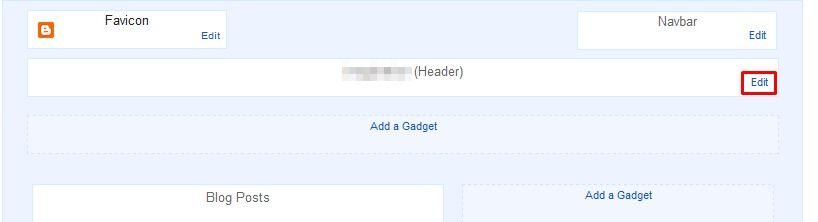
then, go to Layout click Edit on header.


Saturday, September 29, 2012

Drop Down Menu On Sidebar

image preview:
 go to Layout > Add a Gadget > HTML/JavaScript


Wednesday, September 26, 2012

Disable Copy Paste

1. Sign In to blogger.

2. Go to Layout

3. Add a Gadget > HTML/JavaScript

Tuesday, September 25, 2012

Disable Right Click

Sign In to blogger.

Go to Layout
 
click Add a Gadget > HTML/JavaScript

Sunday, September 16, 2012

Remove Blogger Navbar


login to your blogger account.

from dashboard, click More Options > Template > Edit HTML

Add Energy Saving Mode


Login to your blogger.

Then click More Options > Template > Edit HTML.

Thursday, September 13, 2012

Rainbow Link Hover Effect

1. Log in to Blogger

2. Then click More Options > Template > Edit HTML

3. Scroll down to where you see </head> tag.

4. Copy this code:

<script src='http://techieblogger.com/wp-content/uploads/2009/07/rainbow.js'/>

5. Paste the code above </head> tag.

6. Save and done (:


source: twolegersblog

Tuesday, September 11, 2012

Sparkling Cursor


log in to your blogger account

go to More Options > Template > Edit HTML

Wednesday, September 05, 2012

Put Tumblr Follow and Dashboard Button


login to blogger first.

click more options beside the Go to post list button.

then, select Layout

click Add a Gadget then choose HTML/JavaScript